
Gmeek Deploy
Gmeek 部署

📖 内容来源
🌟 Gmeek 博客框架
- 超轻量级个人博客模板
- 完全基于
Github Pages、Github Issues和Github Actions, - 不需要本地部署
📦 一、资源
Gmeek
Markdown 语法
在线编辑工具
🛠️ 二、安装
创建仓库
- 点击通过模板创建仓库,仓库名称:
<用户名>.github.io
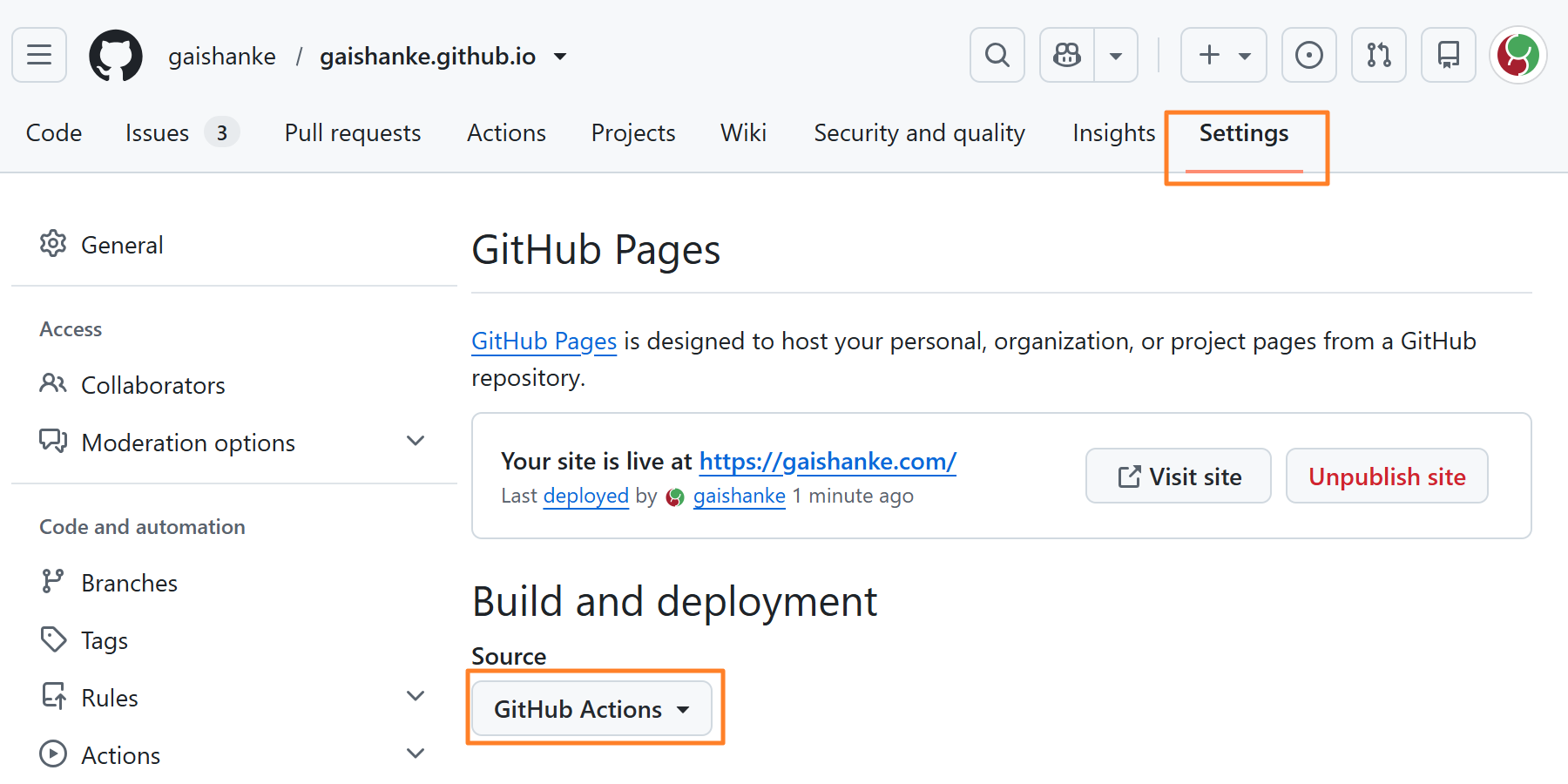
启用 Pages
- 仓库页面导航:
Settings->Pages->Build and deployment Source下拉选择Github Actions
开始写作
- 仓库页面导航:
Issues->New issue Add a title(写标题),Add a description(写描述)。至少添加一个 Labels(标签),Create(创建)- 片刻后可通过
<用户名>.github.io访问 - 仓库页面导航:
Actions->build Gmeek,可查看构建进度

手动全局生成(修改 config.json 或按需要)
- 仓库页面导航:
Actions->build Gmeek->Run workflow
<img src="https://cdn.jsdelivr.net/gh/shenjuexiao/shenjuexiao@main/github_png/gmeek_actions_build-gmeek_run-workflow.png\“ />
⚙️ 三、配置
config.json 必要字段
1 | { |
| 配置参数 | 必填 | 说明 |
|---|---|---|
| title | 是 | 博客标题 |
| subTitle | 是 | 博客描述&自述 |
| avatarUrl | 是 | 博客头像 |
| GMEEK_VERSION | 是 | Gmeek 版本,一般写 last 也可以用具体 tag 版本 |
config.json 其他字段
1 | { |
最后一行配置末尾不需要逗号,其他行末尾都需要逗号(英文逗号)
| 配置参数 | 必填 | 说明 |
|---|---|---|
| displayTitle | 否 | 用于头像后面的标题展示,如果和 title 一致则不用添加 |
| homeUrl | 否 | 博客的主页地址,自定义域名时需要配置 |
| faviconUrl | 否 | 页面的 favicon 地址,如果和 avatarUrl 一致则不用添加 |
| 否 | 用于自动提交仓库时用,不添加也可以 | |
| startSite | 否 | 用于页面底部显示网站运行天数 |
| filingNum | 否 | 用于页面底部显示备案信息 |
| onePageListNum | 否 | 用于首页每页展示的文章数量 |
| singlePage | 否 | 自定义独立页面,例如 about 或者 link 等 |
| iconList | 否 | 用于定义 singlePage 按钮展示的 SVG 图标 (16px),about 和 link 内置无需定义 |
| exlink | 否 | 用于自定义首页右上角圆形按钮到外部链接功能,按钮图标定义在 iconList 中 |
| commentLabelColor | 否 | 用于自定义显示评论数量标签的颜色 |
| yearColorList | 否 | 用于自定义显示不同年份标签的颜色 |
| i18n | 否 | 用于定义博客语言,目前支持 EN/CN/RU |
| UTC | 否 | 用于定义时区 |
| themeMode | 否 | 用于定义主题模式,默认为 manual,也可选择 fix 详细说明 |
| dayTheme | 否 | 用于定义亮主题 |
| nightTheme | 否 | 用于定义暗主题 |
| urlMode | 否 | 用于定义文章链接生成模式,目前支持 pinyin/issue/ru_translit |
| style | 否 | 用于自定义文章页 CSS |
| script | 否 | 用于自定义文章页 JavaScript |
| head | 否 | 用于自定义文章页 head 内容 |
| allHead | 否 | 用于自定义所有页面 head 内容 |
| indexStyle | 否 | 用于自定义首页 CSS |
| indexScript | 否 | 用于自定义首页 JavaScript |
| showPostSource | 否 | 设置为 1 则在文章页显示 issue 链接按钮,设置为 0 则不显示 |
| rssSplit | 否 | 设置 RSS 输出的截断符号,默认 sentence 为第一句话,可配置其他特殊符号 |
| bottomText | 否 | 用于设置文章页面右下角显示的内容 |
| ogImage | 否 | 用于设置 Open Graph 协议展示的图片 |
| primerCSS | 否 | 用于设置 primer.css 的 CDN 地址,默认使用南科大 |
| needComment | 否 | 用于设置是否需要评论功能,1 开启评论,0 关闭 |
修改发布时间
1 | <!-- ##{\"timestamp\":1490764800}## --> |
自定义单篇文章页面的 style 和 script
1 | <!-- ##{\"style\":\"<style>#postBody{font-size:20px}</style>\"}## --> |
多种自定义参数
1 | <!-- ##{\"script\":\"<script async src='//busuanzi.ibruce.info/busuanzi/2.3/busuanzi.pure.mini.js'></script>\",\"style\":\"<style>#postBody{font-size:20px}</style>\",\"timestamp\":1490764800}## --> |
自定义全局文章页面的 style 和 script,config.json 文件添加
1 | \"style\":\"<style>#postBody{font-size:20px}</style>\", |
置顶文章
Pin issue,手动全局生成一次即可。
删除文章
Close issue 或者 Delete issue,手动全局生成一次即可。